
Rule Diagnostics
Use Rule Diagnostics to review the complete rule set for broken references, no-op actions, contradictory conditions, shadowed rules, duplicate rules, and import rules that are too specific. Diagnostics does not change a rule unless you explicitly start a staged fix.
Open it from Tools → Rule Diagnostics (/rules/diagnostics), or the Diagnostics button on the
Rules toolbar.
Budget impact: Diagnostics includes currently staged rules and does not change budget data. A fix you start becomes a normal staged rule change and writes only when you Save. Dismissing a finding saves Actual Bench metadata, not budget data.
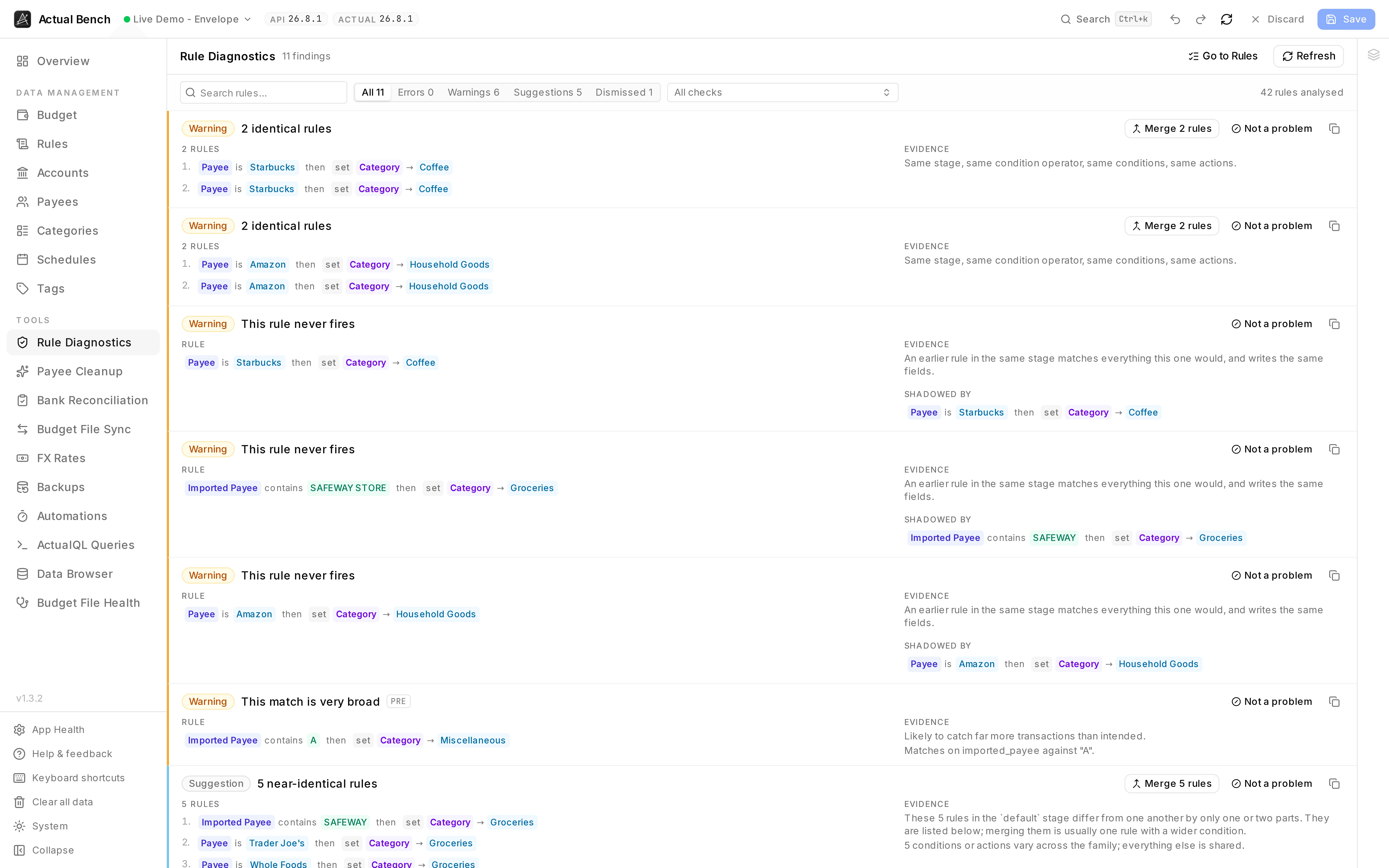
Every finding says what is wrong in a sentence, shows the rule it is about, and where a fix exists offers it - Merge for duplicates, Generalise for a rule matching whole import strings.
Why a rule set needs auditing
Section titled “Why a rule set needs auditing”Rule Diagnostics reports rule-set problems that are difficult to see when editing one rule at a time. Each finding explains the issue, shows the affected rule or rules, and links to an available fix.
Run diagnostics and read findings
Section titled “Run diagnostics and read findings”- Open Rule Diagnostics (Tools sidebar, or the Diagnostics button on the Rules toolbar).
- One list, ordered by what fixing each finding is worth: what is broken first, then how much one fix buys. The filter above it carries every count - All, Errors, Warnings, Suggestions (nothing broken, still worth doing) and Dismissed.
- Each finding is a card: the rule or rules on the left, the evidence on the right, the actions in the header - Merge, Generalise, Not a problem. A colour bar down the edge marks the severity, so a long report can be scanned without reading.
- A rule’s own text is a link to it. Rules are never truncated; a long one clamps with Show the full rule beside it, because you cannot judge a rule you cannot read.
What a finding tells you
Section titled “What a finding tells you”
The title is the problem. The left column is the rule it concerns; the right is how the check knows.
Whatever can be done about it sits in the header, and the stage badge appears only when the rule runs
somewhere other than default.
What it checks
Section titled “What it checks”- Missing payee / category / account / category-group references.
- Empty or no-op actions.
- Impossibly contradictory conditions on
and-rules. - Strictly shadowed rules within a stage.
- Broad match criteria (very short
contains/matchesvalues). - Rules matching whole import strings rather than the merchant (see below).
- Duplicate rule groups, and families of near-identical rules.
- Unsupported field/operator combinations.
Schedule-generated rules skip the checks you could not act on anyway, but still report missing entities.
Rules that match whole import strings
Section titled “Rules that match whole import strings”Actual writes some of your rules for you. When you rename a payee and accept its offer to “apply that rename in the future”, it creates a rule matching the exact bank text of that transaction, and each later rename of the same merchant adds another string to the same list (Actual’s documentation of automatic rules):
imported payee is one of MARKET BOYS PTY LTD Melbourne VI AUS Card xx4534 Value Date: 12/03/2024 MARKET BOYS PTY LTD Melbourne VI AUS Card xx9166 Value Date: 24/12/2024 MARKET BOYS PTY LTD Sydney Value Date: 10/11/2025→ set payee to Market BoysThat rule is already broken. The card number and the value date change every time, so next month’s string is not on the list, the rule does not fire, and a duplicate payee turns up. You rename it. The list grows to four. It will never start working.
Bench spots these and offers Generalise. It reads the strings, finds the part they all agree on,
and proposes imported payee contains "MARKET BOYS PTY LTD" instead. Next month’s variant is caught
by the same rule.
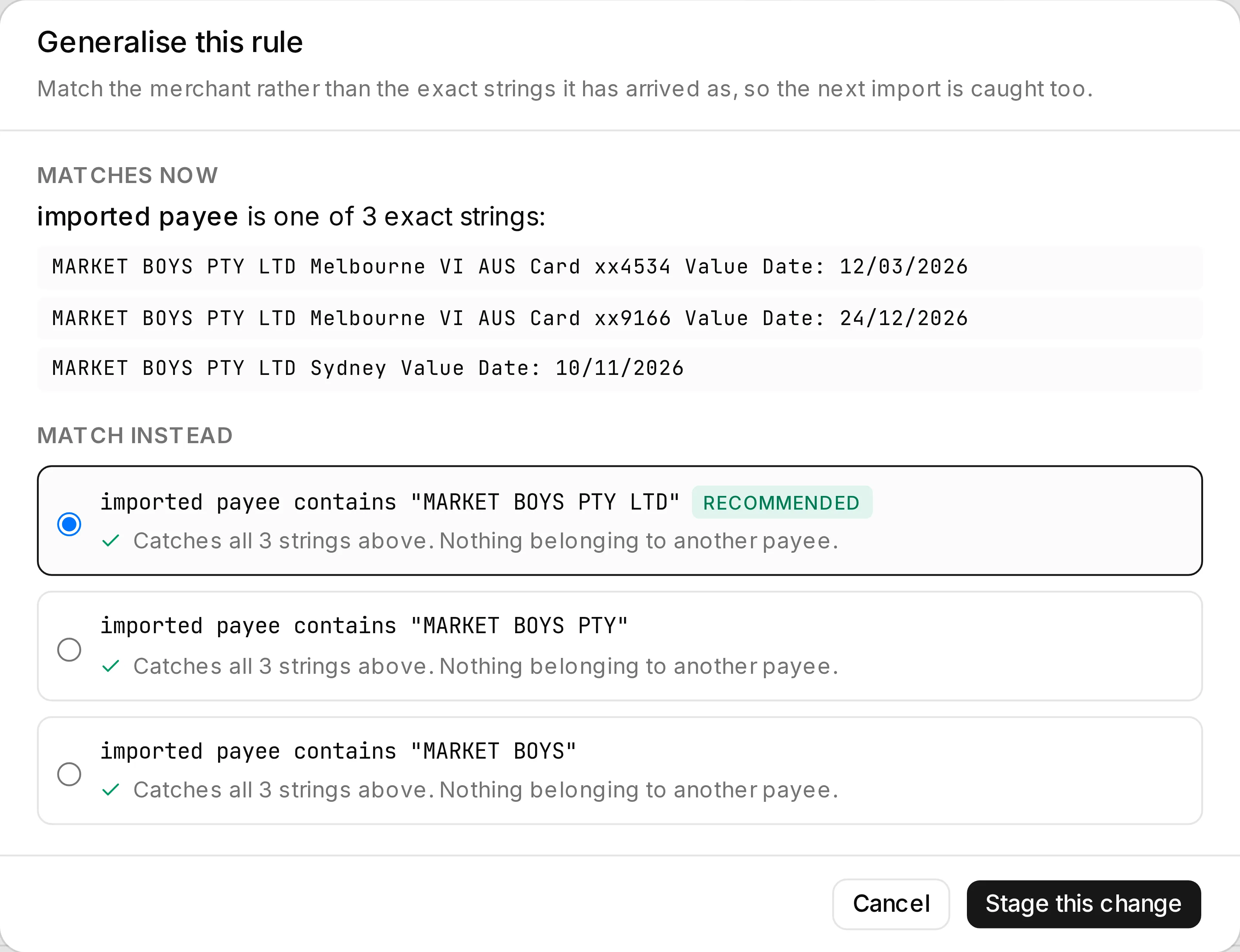
What it matches now, and what it could match instead. Each option carries the result of testing it against your own import history, and the recommended one is the narrowest that still catches everything.
Widening a rule can only ever make it match more. So every proposal is backtested against your own import history before you see it, and the dialog says exactly what each option would newly catch:
- text already going to this rule’s payee, and text belonging to nobody - both harmless;
- text belonging to another payee, named, with examples. Those are never preselected, and confirming one takes an explicit acknowledgement. If every option would do it, nothing is preselected and you have to choose on purpose.
Nothing can be staged until the backtest finishes.
When nothing can be proposed safely, the finding stays as information. No rewrite is offered.
Detection works on shape, because Actual does not mark the rules it writes. So a rule you wrote yourself in that shape gets reported too. That is intentional - it will fail on the next import for exactly the same reason. Nothing changes until you confirm, and the rewrite stages like any other edit.
Act on findings
Section titled “Act on findings”- Click a rule on a finding to edit it right here. The editor opens over the diagnostics page rather than sending you to the Rules page, so the finding that prompted the edit stays on screen while you make it, and the next one is a click away rather than a trip back. Rules are drawn in the same colours the Rules page uses, so the part of the rule a finding is talking about is visible without re-reading the whole thing.
- Over-specific import rules get a Generalise button, which opens the rewrite dialog above and brings you back here afterwards.
- Duplicates and near-identical families get Merge, which opens the merge dialog already filled in with every member, and also brings you back.
- Change your rules while this is open and a stale results banner appears. The old findings stay put until you press Refresh. Dismissing is withheld while results are stale, because a decision taken then would be about evidence that has already moved.
Dismissing what is not a problem
Section titled “Dismissing what is not a problem”Not every finding is a fault. Two rules can be deliberately near-identical, and a broad match can be exactly what you meant. Not a problem takes such a finding off the list for good.
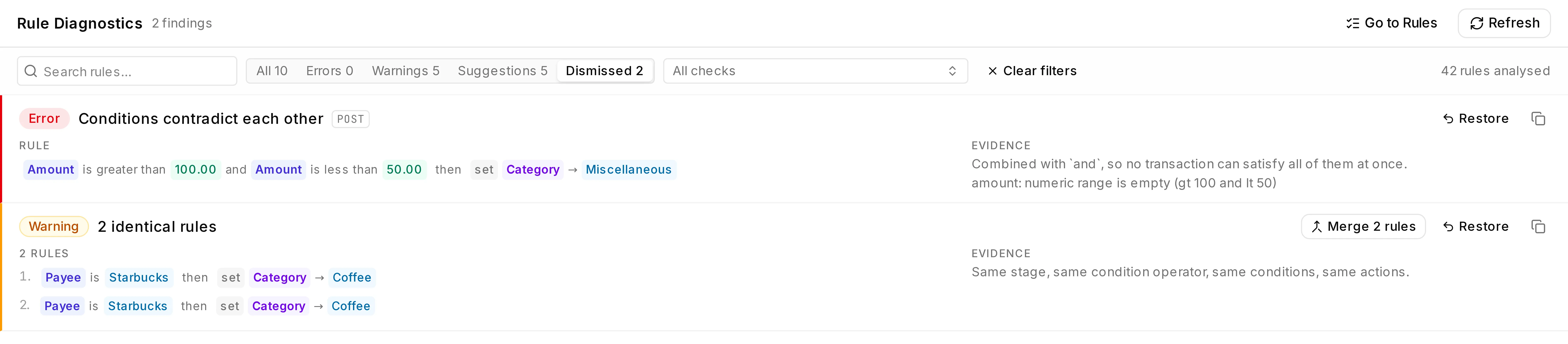
A dismissal moves the finding into the Dismissed scope rather than deleting it, and Restore puts it back. The counts beside it stay honest about what is left.
The decision is remembered per budget, so a judgement about a household file cannot silence a genuine finding in a business one. It survives editing the rules involved - and survives merging them, which gives the rules new ids - because it is recorded against both the rules and what they looked like at the time.
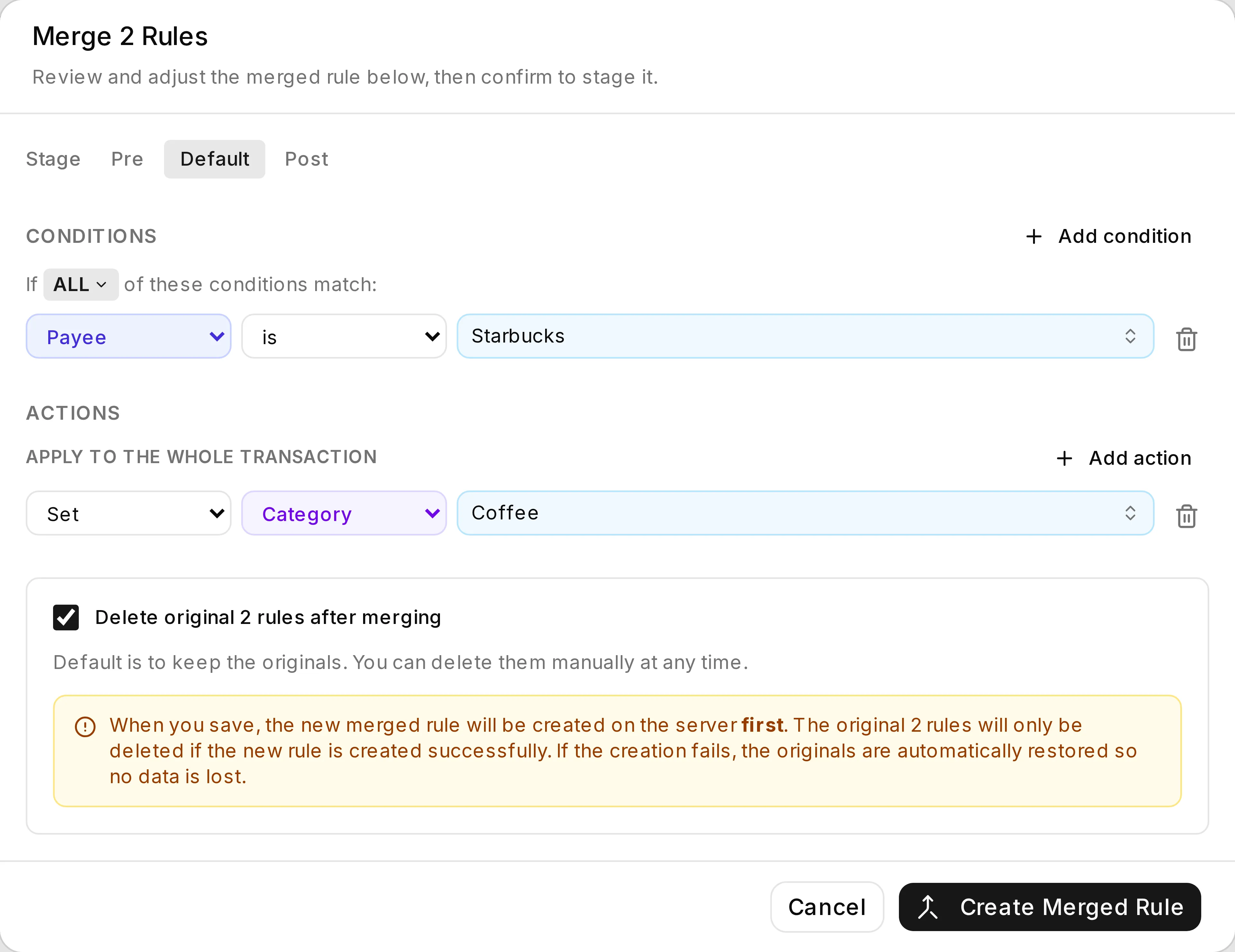
The merge arrives filled in from the finding. Deleting the originals is opt-in, and the new rule is created before anything is removed - so a failure leaves you with what you started with.
Safety
Section titled “Safety”It includes staged rules in the analysis, but it never changes them on its own.
This page never touches a rule. Every fix is something you do deliberately - open a rule, confirm a merge, confirm a generalisation - and every one of those goes through the normal staged Save.
Dismissing is the one thing here that writes immediately, and it writes to Actual Bench’s own database rather than to your budget: which finding, which rules, and what they looked like at the time. It is per budget, so a decision about a household file cannot silence a business one, and it is reversible from the dismissed list.
Troubleshooting
Section titled “Troubleshooting”- A missing-entity finding - that payee, category or account was deleted or renamed. Open the rule and point it somewhere real.
- Results look stale - they are. Press Refresh.
- A large stage was not fully analysed - there is a safety cap on how big a partition gets compared. A notice tells you when one was skipped.
Related pages
Section titled “Related pages”- Rules - build, edit, and merge rules
- Editing, review and save