
FX Rates
Use FX Rates when a Budget File Sync transaction flow converts between currencies. Manage one rate per date, fill coverage gaps, import rates, or set manual overrides. Rates used by a synced transaction remain locked unless you use the previewed update workflow.
FX Rates does not add multi-currency accounts to a single Actual budget.
Open it from Tools → FX Rates (/fx-rates), once a converting flow is configured.
Budget impact: Changing rates saves Actual Bench metadata. Budget transactions change only through a separately reviewed and applied sync update.
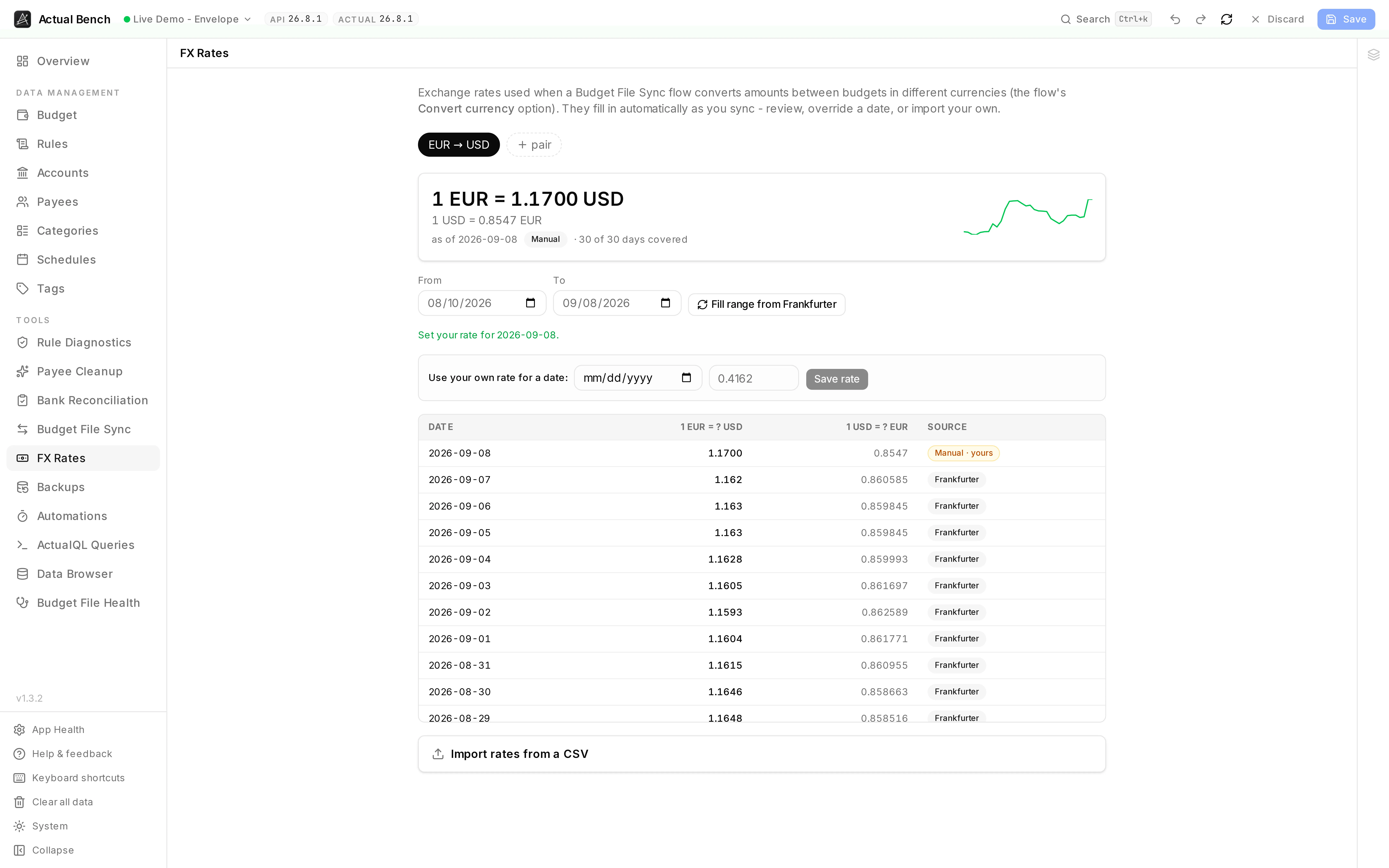
Both directions of the rate, how much of the range is covered, and where every day’s rate came from -
Frankfurter for the ones fetched, Manual · yours for the one that was set by hand.
Get a converting flow ready
Section titled “Get a converting flow ready”- Enable Convert currency on a transaction flow and choose its source and target currencies.
- Open FX Rates and inspect coverage for that pair and date range.
- Fill gaps from Frankfurter, import rates, or set a deliberate override.
- Preview the flow and verify the original amount, rate, and converted amount before Apply.
When currency conversion is used
Section titled “When currency conversion is used”Turn on Convert currency in a transaction flow and give it a source and a target currency. Only transaction flows convert. Payee and category flows have no amounts to convert.
How rates are sourced
Section titled “How rates are sourced”Rates come from a database-backed registry, filled automatically from the free Frankfurter provider:
- No API key is required.
- Rates are date-specific.
- For a date with no published rate (weekends and holidays), Actual Bench falls back to the latest prior rate.
- If the provider is briefly unavailable, a converting sync doesn’t fail - affected rows go to review as FX pending (see Budget File Sync).
You can also override any date manually or import rates from a CSV.
Open the FX Rates page
Section titled “Open the FX Rates page”The page is organized per currency pair:
- A hero card shows the latest rate, a trend sparkline, and coverage for the selected date range.
- Currency pairs are seeded from your FX-enabled flows, and you can add your own.
View rate history and coverage
Section titled “View rate history and coverage”Below the hero, a coverage ledger lists every day in the range, calling out gaps, and labels each rate’s source (Frankfurter, Uploaded, Manual, or Derived).
Fill missing rates
Section titled “Fill missing rates”Select Fill range from Frankfurter to backfill every missing day in the range in one click. Actual Bench reports how many days were inserted versus already set.
Override a rate
Section titled “Override a rate”Use Set your rate to enter a rate for a specific date manually.
- Manual rates take precedence for that date and pair.
- When your override affects already-synced transactions, an impact preview lists them with their old → new converted amounts, so you can see the effect before deciding to update.
Import rates from CSV
Section titled “Import rates from CSV”Import a CSV of rates for a pair from the FX Rates page. Uploaded rows are labeled with the Uploaded source in the coverage ledger.
Preview a converted transaction
Section titled “Preview a converted transaction”In a converting flow’s sync preview, each row shows the original amount, the applied rate, and the converted amount, each labeled with its currency. A missing or future-dated rate is sent to the review queue as FX pending rather than failing the run.
Immutable snapshots and rate locking
Section titled “Immutable snapshots and rate locking”- Every converted transaction stores an immutable snapshot - the exact rate, source/target amounts, provider, and dates - plus a compact audit note on the target transaction.
- Rates lock at first sync, so a later rate change never silently rewrites past conversions.
- To apply a corrected rate to already-synced transactions, use the opt-in Update synced transactions when the rate changes flow option, which goes through the normal previewed, safety-checked update path.
Limitations
Section titled “Limitations”- No FX gain/loss accounting.
- No silent recalculation of past conversions.
- No multi-currency within a single Actual budget file.
- Rate availability depends on the provider and on the coverage you’ve filled or imported.
See Known Limitations for the full list.
Troubleshooting
Section titled “Troubleshooting”- “FX pending” in a preview - no usable rate was found for that date and pair. Either none has been recorded yet, in which case Fill range from Frankfurter, add an override, or import a CSV; or the provider was briefly unavailable, in which case previewing again once it recovers is enough.
- A weekend or holiday date - Actual Bench falls back to the latest prior rate; fill the range if you want explicit coverage.
- A future-dated transaction - a future rate isn’t available; it stays FX pending until a rate exists.
- CSV rejected - check the columns and values against the in-app import guidance.
- Wrong pair direction - confirm the source and target currencies on the flow.
- Converted amount differs slightly - rounding is applied to the final converted amount.