
Backups
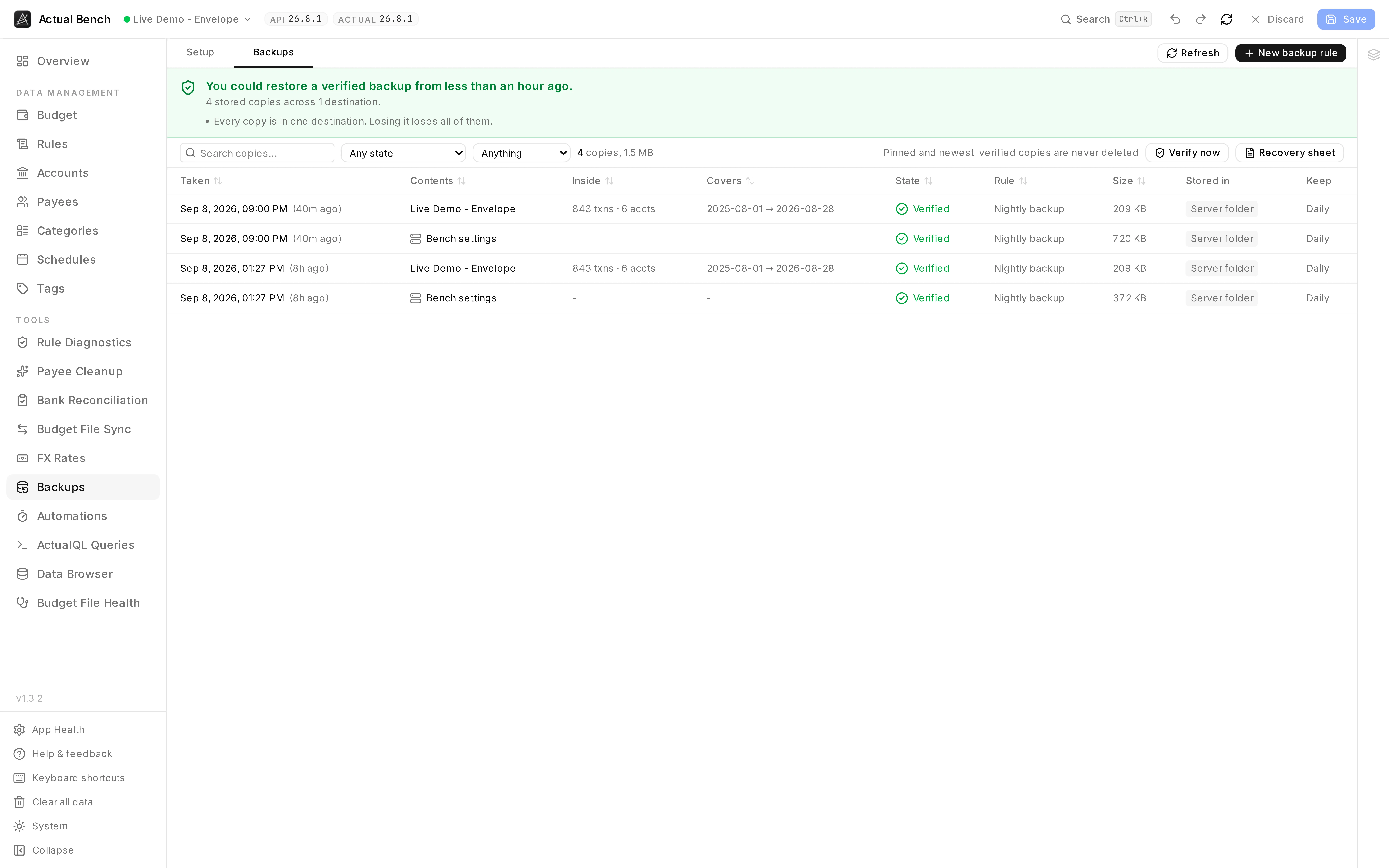
Use Backups to create scheduled copies of your budget and Actual Bench settings. Actual Bench verifies each copy before marking it as verified. You can use multiple destinations, including a server folder or an S3-compatible bucket.
Open it from Tools → Backups (/backups).
Budget impact: Backups does not modify budget data. It writes backup files to the configured destinations and saves backup records in Actual Bench.
Where copies go, what gets copied and when. The rule row carries its own history: when it last ran and how many copies that run verified.
The page has two tabs:
- Setup - where copies go, what gets copied and when, and whether Bench should take one before you do something risky.
- Backups - the copies that exist: how old they are, whether they have been opened and read, and where they live.
A fresh install opens on Setup, because there is nothing else to look at yet.
Check backup status
Section titled “Check backup status”The summary shows the newest copies, their verification status, destination health, and any problem that needs attention.
Setup: Backup Destinations
Section titled “Setup: Backup Destinations”Choose one or both destination types:
- A folder on this server - any absolute path the server can write to: a mounted volume, a NAS share, a second disk. Bench creates it if it does not exist.
- An S3-compatible bucket - AWS, but equally MinIO on a NAS, Backblaze B2, Cloudflare R2, Wasabi
or Garage. Access keys are encrypted with your server’s
SYNC_VAULT_KEYand never stored in readable form.
Bench checks a folder path while you are typing it rather than at 3am when the backup runs. It will
tell you the directory does not exist and create it, that it cannot write there, that the volume is
nearly full, or that the folder is on the same disk as Bench’s own data - that last one is a warning,
not a refusal, because /data/backups is a perfectly sensible arrangement that simply is not
off-site.
Those checks run again when you press Save, and a folder that fails them is not saved. That matters more than it sounds: a destination stored despite failing looks configured, counts towards having your copies in two places, and does nothing until the night you need it.
Once a destination is saved, Bench tests it by using it: it writes real bytes, reads them back, compares checksums and deletes the test file. A test that only checked credentials would pass on a read-only volume, which is exactly the configuration people get wrong.
A bucket that accepts writes but refuses deletes is a warning rather than an error. Immutable buckets are a real choice; backups still work, and only retention is affected.
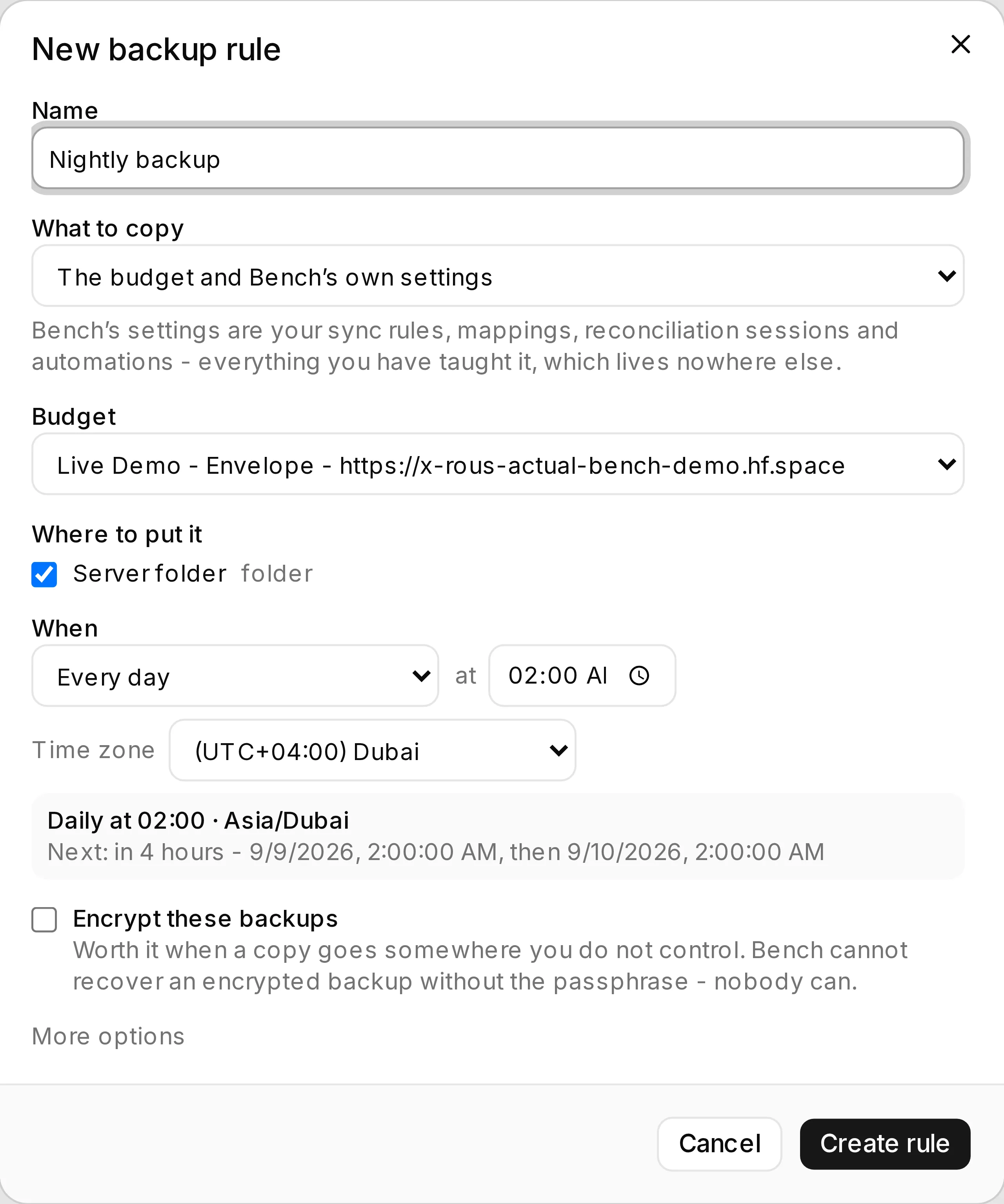
One rule answers four questions - what to copy, from which budget, to which destinations, and when - and says plainly when a budget can only be copied on request.
Setup: Backup Rules
Section titled “Setup: Backup Rules”A rule says what to copy, where to put it, how often, and how long to keep it.
-
What - the budget, Bench’s own settings, or both. Bench’s settings are your sync flows and mappings, reconciliation sessions, automations, saved queries and payee-cleanup decisions: everything you have taught Bench, which lives nowhere else.
-
Which budget - any budget you have connected to, or any saved budget (it connects when you choose it). A scheduled backup runs with your browser closed, so it needs an enrolled connection whose credentials the server can use on its own; the rule offers to enrol one on the spot rather than sending you elsewhere.
A Direct connection works the same way once it is enrolled. Until then - or on a server without a vault key - it is offered as a manual rule: there is no schedule, and Back up now exports the budget here and hands it to Bench, which stores and verifies it exactly like any other copy - same destinations, same checks, same list of copies. It is a copy you have to ask for, not a lesser one. To schedule it later, enrol the connection and edit the rule.
Backups taken by hand are kept until you delete them. Bench does not expire them, so a rule you run often will accumulate copies rather than rotating them the way a scheduled rule does.
One difference worth knowing: a manual rule has no automation behind it, so it does not appear on the Automations page and keeps no run history. You get the result of each backup when you press the button; the copies themselves are listed under Backups like all the others.
-
When - for a scheduled rule: every few hours, every day at a time you pick, on chosen days of the week, once a month, or a cron expression for the people who want one. Whichever you choose, Bench says back what it understood and when the next run actually lands. A manual rule has no schedule and nothing to say here.
-
Encryption - off by default, because for most self-hosted setups the copy lands on a volume you already control and encryption mainly adds a way to lose the data permanently. Turn it on when a copy goes somewhere you do not control. Bench cannot recover an encrypted backup without the passphrase, and neither can anyone else.
Deleting a rule stops it running and keeps the backups it already took - including the passphrase that opens the encrypted ones. Bench forgets that passphrase on its own once the last copy needing it is gone, and lists it under Passphrases Bench still holds until then.
Each rule shows just enough to answer “is this working?” - whether it is paused, when it last ran and when it runs next - and links to Automations for run history, retries, logs and failures. Scheduled rules run on Bench’s automation engine, so that page is where their full history lives; Backups does not keep a second copy of it. A manual rule has no automation and so no run history - its result is reported when you press Back up now.
Verification
Section titled “Verification”Every copy is checked before it is trusted, at one of three depths:
| Level | What it does |
|---|---|
| Quick | Confirms it is a real archive containing what an Actual export contains. |
| Normal | Opens the database, runs SQLite’s integrity check, and counts what is inside. The default. |
| Thorough | The full Budget File Health check, including relationship checks. |
Verification runs on the plaintext, before encryption. Verifying afterwards would only prove bytes survived a round trip, which is the least interesting thing that can go wrong.
Bench also compares each copy with the one before it. A copy with far fewer transactions, fewer accounts, or less than half the size does not pass verification, because a cut-short export is a perfectly valid file containing the wrong budget. If you deleted those transactions yourself, that is expected and the copy is still there - Bench just will not tell you it checked out.
A copy that fails verification is still stored, and clearly marked. A backup Bench distrusts is more useful than no backup - as long as nobody is allowed to believe it is fine.
Weekly verification
Section titled “Weekly verification”Storage rots quietly. A full volume truncates a file, a failing disk flips a bit, somebody tidies a bucket, and nothing announces any of it. Once a week Bench re-reads the newest few copies in every destination, re-computes their checksums, and opens the newest one properly - decrypting it first where it has the passphrase, so an encrypted backup is proved to be decryptable rather than merely present.
Verify now does the same thing on demand.
Retention
Section titled “Retention”Retention keeps a sensible spread - so many daily, weekly, monthly and yearly copies - but it is written as a set of refusals first:
- A pinned copy is never deleted.
- A protected copy is never deleted while protected.
- Nothing newer than the minimum age is deleted, whatever the rules say.
- The newest verified copy always survives. If none has verified, the newest copy survives instead.
- A backup you took by hand is never expired on your behalf.
There is no combination of settings that empties a destination.
Retention on a rule shows exactly what would be removed and why, before anything happens - and that preview is produced by the same code that does the pruning, so it is what will happen rather than an approximation of it.
Recovery points
Section titled “Recovery points”Before Bench saves a batch of deletions or payee merges, it copies the budget first, so there is something from five minutes ago rather than only from last night. Several changes in one session share a recovery point, and these expire on their own instead of piling up forever.
If a recovery point cannot be taken, Bench asks rather than deciding for you: your changes stay unsaved, the reason is shown, and you can save anyway.
Turn it off from the checkbox under the rules if you would rather it did not.
Backing up Bench itself
Section titled “Backing up Bench itself”A rule set to copy Bench settings snapshots Bench’s own metadata database - your sync flows and mappings, reconciliation sessions, automations, saved queries and payee-cleanup decisions. It needs no budget connection at all, because it is a local database copy.
Restoring it is an operator job rather than an in-app one: see
Upgrades & backups, which covers where the file goes
and why the SYNC_VAULT_KEY has to travel with it.
Getting a backup back
Section titled “Getting a backup back”Look inside opens a copy and tells you what is in it - accounts, payees, transactions and the date range - without restoring anything. That is usually the real question: not “is this file intact” but “is this the one”.
Download hands you the file. Put it into Actual Budget with Import file → Actual: it creates a new budget from the copy, and the budget you are using is untouched.
Bench does not import for you. Actual’s HTTP API has no import endpoint, and a restore that half-worked would be worse than one you did deliberately.
If Bench itself is gone
Section titled “If Bench itself is gone”Every backup is written with a manifest beside it describing what it is, when it was taken, its checksum and whether it is encrypted. So:
- Find backups rebuilds the inventory by reading those manifests. Restore Bench onto a fresh machine, point it at the same bucket, and your backup history comes back.
- Recovery sheet is a page of Markdown to print or keep with your passwords. It names the real
paths and object keys, gives commands that work with
unzip,sqlite3andnode, and documents the encrypted file format byte by byte. It contains no secret, so it is safe to keep where you keep such things.
The downloaded ZIP is exactly what Actual’s own export produces. It opens whether or not Bench still exists - which is the entire point.