
ActualQL Queries
Use ActualQL Queries to answer questions that standard screens do not cover. Queries use JSON and are read-only; start with an example and adapt it to your data.
Open it from Tools → ActualQL Queries (/query). It works in both connection modes.
Budget impact: Queries do not change budget data. Results show saved server state, not unsaved drafts.
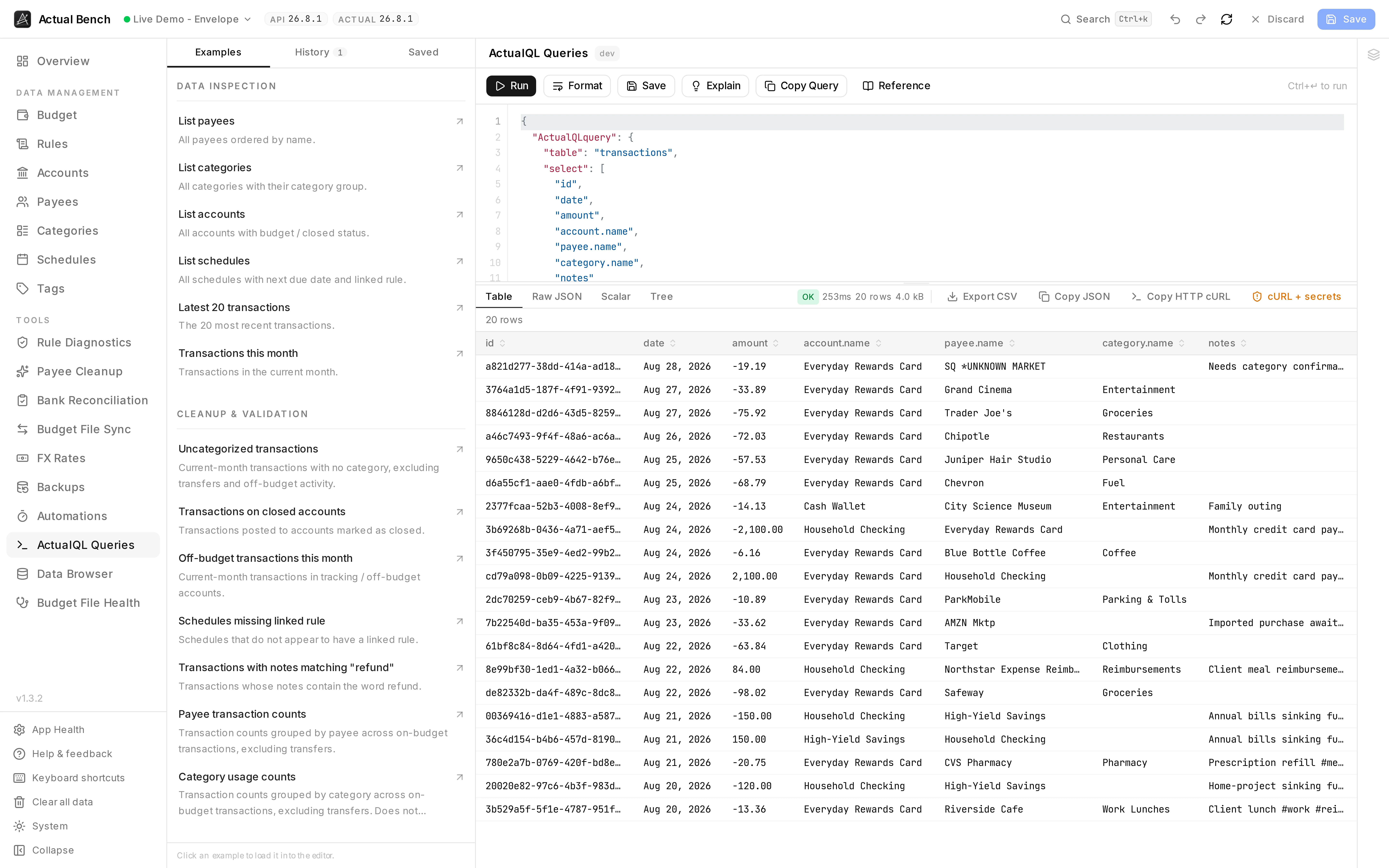
Examples on the left, the query in the middle, the answer underneath - with how long it took, how much came back, and a button for each way you might want to take it away.
Get an answer quickly
Section titled “Get an answer quickly”- Open Examples and choose the closest question.
- Adjust its table, fields, filters, or dates.
- Select Explain to check your intent without running it.
- Select Run, then choose Table, Raw JSON, Scalar, or Tree.
- Save a useful query or export the result.
What ActualQL is
Section titled “What ActualQL is”ActualQL is Actual Budget’s query language. It is JSON, not SQL. Here it only ever reads.
Open the workspace and understand the editor
Section titled “Open the workspace and understand the editor”- A syntax-highlighted JSON editor with line numbers. It does not autocorrect anything you type.
- Both shapes work: a bare query object, or the
{ "ActualQLquery": ... }wrapperactual-http-apiuses. - Drag the divider between editor and results. It stays where you put it.
Run and format a query
Section titled “Run and format a query”- Type or paste a query.
- Select Run (or press
Ctrl/Cmd+Enter). - Use Format JSON to tidy the query.
Parse errors appear inline, before anything is sent. Lint warnings catch the shapes that usually
mean a mistake: a wide-open transactions query with no limit, groupBy or calculate; an empty
$oneof; a groupBy with nothing to aggregate.
Use built-in examples and reference
Section titled “Use built-in examples and reference”- ActualQL Reference - a six-section quick reference (basics, filter operators, joined fields, aggregates, transactions options, and copyable snippets).
- Example packs - one-click inserts grouped into Data inspection, Cleanup & validation, Aggregation, and Targeted subset.
Understand result views
Section titled “Understand result views”Select a result view via tabs:
- Table - one column per key found anywhere in the rows, nested values stringified, capped at 500
rows with a banner saying so. Dates read as dates.
amountandbalanceshow as decimals, with the raw integer on hover. - Raw JSON - the full syntax-highlighted payload.
- Scalar - a large value card for
calculateaggregate results. - Tree - a collapsible JSON tree, auto-selected for plain-object results.
An execution metadata bar shows an OK / Error chip, elapsed time, row count, and payload size.
Explain a query
Section titled “Explain a query”Explain describes the query back to you in English - which table, which filters, the grouping, the aggregation, the order, and whether you will get a table or one number. It does not run anything.
Save, pin, and reuse queries
Section titled “Save, pin, and reuse queries”- Save a query under a name. Saved queries live in the Bench database and follow you to every budget on the instance - not one browser, not one budget. Load, rerun, duplicate, rename, delete, pin. Queries from an older version, which lived per-budget in your browser, are imported the first time you open the page.
- History keeps the last 10 queries you ran, per budget. Run one again and it moves to the top instead of appearing twice.
Export and copy results
Section titled “Export and copy results”- Copy result JSON and Copy query JSON are available in all modes.
- In HTTP API Server mode you can also copy sanitised cURL, with placeholders where the secrets were, or full cURL, which is opt-in and labelled. Either is built from the last request you actually sent, not from whatever is in the editor now.
Staged changes and query results
Section titled “Staged changes and query results”With a draft open, a banner reminds you that results come from saved server state. Your pending edits are not in them.
Practical examples
Section titled “Practical examples”Use the example packs. They cover transactions, accounts, payees, categories, monthly spending, budget status and rules, and they are kept current with the app.
Mode differences
Section titled “Mode differences”- ActualQL runs in both Direct and HTTP API Server mode.
- cURL generation is HTTP API Server-only, because it targets
actual-http-api’s/run-queryendpoint.
Troubleshooting
Section titled “Troubleshooting”- Invalid JSON - the inline error points at the character. Fix it and run.
- Unsupported query - check the lint warnings and the ActualQL Reference.
- Empty result - check your filters and your date range.
- The table view is useless - try Tree or Raw JSON.
- Results look stale - they show saved state. Save your draft first.
- No cURL button - you are in Direct mode. cURL only exists for HTTP API Server.
Related pages
Section titled “Related pages”- Rules
- Budget File Health · Data Browser - the same data from an exported snapshot
- Connect to Actual Budget